Acumatica Generic Inquiries: A Beginner’s Guide to Extracting Exactly the Data You Need

Data is the lifeblood of your business, but it is only useful if you can access it. In many ERP systems, pulling a custom list of transactions requires a call to an expensive developer. Acumatica changes that with Generic Inquiries (GIs).

Think of a Generic Inquiry as asking Acumatica a precise question and getting a real-time spreadsheet as an answer. Whether you need to build dashboards, export data to Excel, or feed Power BI via OData, GIs are your ultimate starting point.

Here is a step-by-step beginner’s guide to extracting exactly what you need without writing a single line of code.

Step 1: Hunt for Your Back-End Data

Acumatica stores data in Data Access Classes (DACs), which act as the back-end database tables. Before creating an inquiry, you must identify which table holds your data.

Fortunately, you do not have to guess. You can find the right tables using Acumatica’s built-in Inspect Element tool:

  1. Navigate to the screen containing the data you want (e.g., the Invoices and Memos screen).
  2. Click CUSTOMIZATION in the top-right menu and select Inspect Element.
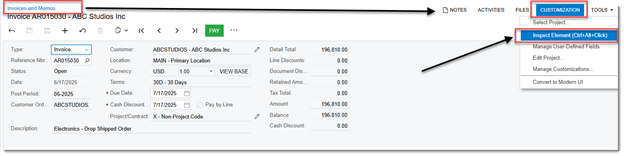
Acumatica Customization menu showing Inspect Element option

  1. Click on the specific data field you want to extract.
  2. A popup window will reveal the exact Data Class (table name) and Data Field name.

Tip: For instance, if you look up invoice data, you will discover the primary table name is ARInvoice.
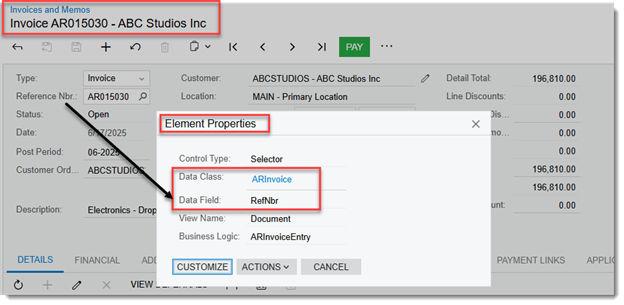
Inspect Element popup revealing Data Class and Data Field names

Step 2: Create a New Generic Inquiry

Now that you know your source table, you can build your query.

  1. Use the universal search or go to Customization > Generic Inquiry.
  2. Type a clear name in the Inquiry Title field (e.g., AR – Open Invoices).
  3. Click the Save icon on the top toolbar.

How to make it show up in your menus:
Instead of typing menu paths into text boxes, click the PUBLISH TO THE UI button located on the top toolbar. A popup wizard will open, allowing you to visually choose the exact Workspace and Category sidebar location where you want this report to live.
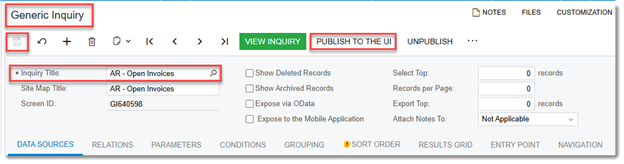
Publish to the UI wizard for choosing workspace and category

Step 3: Add Your Tables (The Data Sources Tab)

Next, tell Acumatica where to look for the data.

  1. Click the very first tab labeled DATA SOURCES.
  2. In the grid below, click the + (Add Row) icon.
  3. Search for your primary table (like ARInvoice) under the table column and select it.
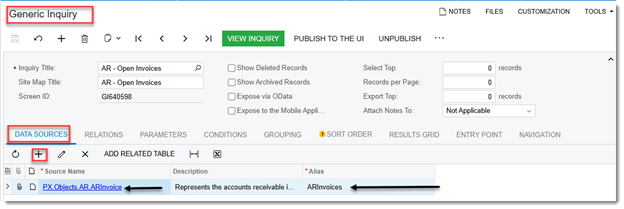
Data Sources tab showing table selection grid

  1. If you only need data from this single table, skip to Step 4.

Need data from multiple places?
If you want to pull customer information along with the invoice, you will need a second table, like Customer. Use the RELATIONS tab right next to Data Sources to link your tables together using common database keys.

Step 4: Choose Your Fields (The Results Grid)

The RESULTS GRID tab defines the columns that will show up on your final report.

  1. Click the RESULTS GRID tab.
  2. Click the + icon to add a row.
  3. Select your active Table under Object and choose the specific Data Field you want to display (such as RefNbr, DocDate, or OrigDocAmt).
  4. Use the Caption column to give your field a clean, human-readable label (e.g., changing RefNbr to Invoice Number).
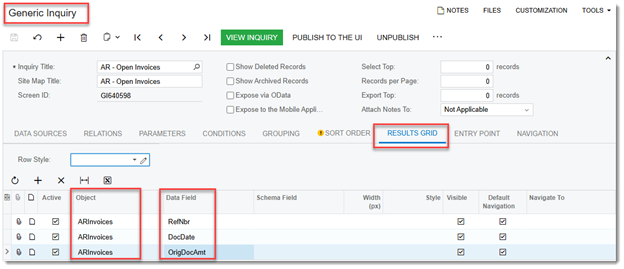
Results Grid tab showing field selection and caption columns

  1. Click the Save icon on the top toolbar.

Step 5: Filter the Noise with Conditions

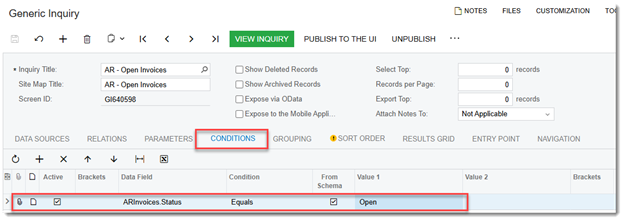
A good report only shows relevant information. To avoid pulling thousands of historic, closed records, use the CONDITIONS tab.

Conditions tab showing filter setup with dynamic parameters

Step 6: Preview Your Work

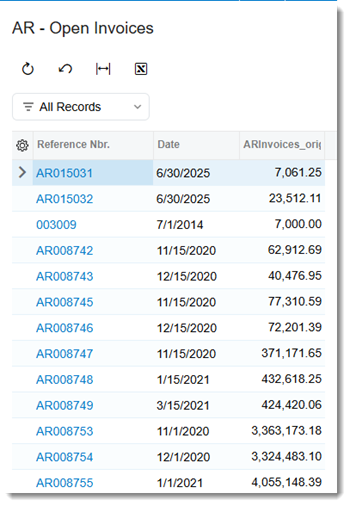
Once your configurations are set, click the bright green VIEW INQUIRY button on the top toolbar. This will instantly launch your live report in a new view, letting you confirm that your columns look clean and your filters are working perfectly.
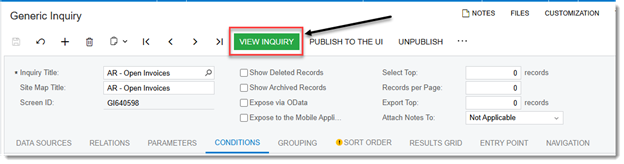
View Inquiry button on the top toolbar
Live Generic Inquiry report preview

Next Steps: Unleash Your Data

A finished Generic Inquiry is highly versatile. You can click Export to Excel from the final report view to instantly analyze your records. On your setup screen, you can also check the Expose via OData box. This creates a secure live feed, allowing power users to pull real-time Acumatica data directly into Microsoft Power BI or Excel dashboards.

Why Agile Consulting?

Agile Consulting helps growing construction and specialty trade contractors modernize operations through practical ERP solutions.

Ready to Get More Out of Your Acumatica Data?

📅 Schedule a Generic Inquiry Workshop with Agile Consulting, Inc.

One Platform. Every Answer. Every Report.

🌐 www.agile-usa.com

aghazali@agile-usa.com

Still Running Your Roofing Business on QB

As roofing companies grow, many find themselves juggling multiple systems:

While this setup works initially, it often creates challenges that slow down operations and limit visibility.

This is where Acumatica Construction Edition can be a game changer. Instead of managing accounting, sales, operations, field service, and reporting across multiple applications, Acumatica brings everything together in a single construction-specific ERP platform.

Key Benefits for Roofing Contractors

🏠 Real-Time Job Costing

Track labor, materials, equipment, subcontractors, change orders, and committed costs by project. Know job profitability while work is still in progress, not after it is completed.

📈 Lead-to-Project Workflow

Convert opportunities into estimates, contracts, projects, billing, and warranty management without re-entering data.

📦 Material and Purchasing Control

Manage purchase orders, inventory, direct-to-jobsite deliveries, and project-specific material costs to help protect margins and reduce costly surprises.

🚚 Field Service and Dispatch

Schedule crews, manage repairs and warranty work, capture field time and expenses, and generate invoices directly from service orders.

📱 Mobile Access for Field Teams

Project managers and crews can submit daily reports, track time, access plans, upload photos, and stay connected from anywhere.

💰 ERP-Level Financial Management

Move beyond basic accounting with advanced project accounting, cash management, multi-entity support, dashboards, and real-time reporting.

📊 Executive Visibility

View job profitability, backlog, WIP, cash position, labor utilization, and sales pipeline from a single dashboard.

The Real Value

👉 The biggest value is not just adding features. It is replacing disconnected systems with a unified platform that connects sales, operations, field crews, project managers, and accounting.

For roofing contractors looking to scale, improve margins, and gain real-time visibility, Acumatica Construction Edition is worth a serious look.

Why Agile Consulting?

Agile Consulting helps growing construction and specialty trade contractors modernize operations through practical ERP solutions.

Ready to Replace QuickBooks + Jobber?

📅 Schedule a Roofing ERP Assessment with Agile Consulting, Inc.

One Platform. Every Roof. Every Step.

🌐 www.agile-usa.com

aghazali@agile-usa.com

Post Go-Live Support: Ensuring ERP Success

Implementing an Enterprise Resource Planning (ERP) system is a significant milestone for any organization. However, the journey doesn’t end once the system goes live. In fact, the post go-live phase is crucial for ensuring the long-term success of the ERP implementation. This blog post will explore the importance of post go-live support, the challenges organizations face, and practical strategies to ensure a smooth transition and ongoing success.

 
Eye-level view of a team collaborating on ERP support


Eye-level view of a team collaborating on ERP support
 

Understanding Post Go-Live Support


Post go-live support refers to the assistance provided to users and stakeholders after the ERP system has been implemented and is operational. This phase is essential for several reasons:

 
    • User Adoption: Ensuring that employees are comfortable and proficient with the new system is vital for maximizing its benefits.

    • Issue Resolution: Problems may arise after the system goes live, and having a support structure in place helps address these issues promptly.

    • Continuous Improvement: Feedback from users can lead to enhancements that improve system functionality and user experience.


The Importance of User Training


One of the most critical aspects of post go-live support is user training. Without proper training, employees may struggle to adapt to the new system, leading to frustration and decreased productivity. Here are some effective training strategies:

 
    • Hands-On Workshops: Conduct interactive workshops where users can practice using the system in a controlled environment.

    • Online Resources: Provide access to online tutorials, user manuals, and FAQs that employees can refer to as needed.

    • Ongoing Support: Establish a helpdesk or support team that users can contact for assistance with any questions or issues.


Common Challenges in the Post Go-Live Phase


Organizations often face several challenges during the post go-live phase. Understanding these challenges can help in developing effective strategies to overcome them.


Resistance to Change


Employees may resist the new system due to fear of the unknown or discomfort with change. To combat this, organizations should:

 
  • Communicate Benefits: Clearly articulate the advantages of the new ERP system, such as improved efficiency and streamlined processes.

  • Involve Employees: Engage employees in the implementation process to foster a sense of ownership and reduce resistance.


Technical Issues


Technical problems can arise after the system goes live, impacting user experience and productivity. To mitigate these issues:

 
  • Regular System Checks: Conduct routine system maintenance and updates to ensure optimal performance.

  • Feedback Mechanism: Implement a system for users to report issues easily, allowing for quick resolution.


Strategies for Effective Post Go-Live Support


To ensure the success of an ERP system post go-live, organizations should adopt several key strategies:


Establish a Support Team


Creating a dedicated support team can significantly enhance the post go-live experience. This team should consist of:

 
  • ERP Experts: Individuals with in-depth knowledge of the ERP system who can provide technical support.

  • User Advocates: Team members who understand the users’ needs and can communicate their concerns to the technical team.


Monitor System Performance


Regularly monitoring the ERP system’s performance is crucial for identifying potential issues before they escalate. Key performance indicators (KPIs) to track include:

 
  • System Uptime: Ensure the system is operational and accessible to users.

  • User Satisfaction: Conduct surveys to gauge user satisfaction and identify areas for improvement.


Foster a Culture of Continuous Improvement


Encouraging a culture of continuous improvement can lead to ongoing enhancements in the ERP system. This can be achieved by:

 
  • Soliciting Feedback: Regularly ask users for their input on system functionality and areas for improvement.

  • Implementing Changes: Act on user feedback to make necessary adjustments and enhancements to the system.


Case Study: Successful Post Go-Live Support


To illustrate the importance of effective post go-live support, consider the case of a mid-sized manufacturing company that recently implemented an ERP system. Initially, the company faced significant challenges, including user resistance and technical issues. However, by establishing a dedicated support team and providing comprehensive training, the organization was able to turn things around.

 
  • User Training: The company conducted hands-on workshops and created online resources, resulting in a 70% increase in user proficiency within three months.

  • Support Team: The dedicated support team resolved technical issues within hours, significantly improving user satisfaction.


As a result, the company saw a 30% increase in operational efficiency within six months of going live.


Conclusion


Post go-live support is a critical component of ERP success. By focusing on user training, addressing common challenges, and implementing effective support strategies, organizations can ensure a smooth transition to their new system. Remember, the goal is not just to implement an ERP system but to make it a valuable tool that enhances productivity and drives business success.


As you embark on your ERP journey, prioritize post go-live support to maximize the benefits of your investment. Engage your team, monitor performance, and foster a culture of continuous improvement to ensure your ERP system delivers lasting value.

Choosing the Right ERP: A Comprehensive Guide

Implementing an Enterprise Resource Planning (ERP) system is a significant milestone for any organization. However, the journey doesn’t end once the system goes live. In fact, the post go-live phase is crucial for ensuring the long-term success of the ERP implementation. This blog post will explore the importance of post go-live support, the challenges organizations face, and practical strategies to ensure a smooth transition and ongoing success.

 
Eye-level view of a team collaborating on ERP support

Eye-level view of a team collaborating on ERP support
 

Understanding Post Go-Live Support


Post go-live support refers to the assistance provided to users and stakeholders after the ERP system has been implemented and is operational. This phase is essential for several reasons:

 
    • User Adoption: Ensuring that employees are comfortable and proficient with the new system is vital for maximizing its benefits.

    • Issue Resolution: Problems may arise after the system goes live, and having a support structure in place helps address these issues promptly.

    • Continuous Improvement: Feedback from users can lead to enhancements that improve system functionality and user experience.


The Importance of User Training


One of the most critical aspects of post go-live support is user training. Without proper training, employees may struggle to adapt to the new system, leading to frustration and decreased productivity. Here are some effective training strategies:

 
    • Hands-On Workshops: Conduct interactive workshops where users can practice using the system in a controlled environment.

    • Online Resources: Provide access to online tutorials, user manuals, and FAQs that employees can refer to as needed.

    • Ongoing Support: Establish a helpdesk or support team that users can contact for assistance with any questions or issues.


Common Challenges in the Post Go-Live Phase


Organizations often face several challenges during the post go-live phase. Understanding these challenges can help in developing effective strategies to overcome them.


Resistance to Change


Employees may resist the new system due to fear of the unknown or discomfort with change. To combat this, organizations should:

 
  • Communicate Benefits: Clearly articulate the advantages of the new ERP system, such as improved efficiency and streamlined processes.

  • Involve Employees: Engage employees in the implementation process to foster a sense of ownership and reduce resistance.


Technical Issues


Technical problems can arise after the system goes live, impacting user experience and productivity. To mitigate these issues:

 
  • Regular System Checks: Conduct routine system maintenance and updates to ensure optimal performance.

  • Feedback Mechanism: Implement a system for users to report issues easily, allowing for quick resolution.


Strategies for Effective Post Go-Live Support


To ensure the success of an ERP system post go-live, organizations should adopt several key strategies:


Establish a Support Team


Creating a dedicated support team can significantly enhance the post go-live experience. This team should consist of:

 
  • ERP Experts: Individuals with in-depth knowledge of the ERP system who can provide technical support.

  • User Advocates: Team members who understand the users’ needs and can communicate their concerns to the technical team.


Monitor System Performance


Regularly monitoring the ERP system’s performance is crucial for identifying potential issues before they escalate. Key performance indicators (KPIs) to track include:

 
  • System Uptime: Ensure the system is operational and accessible to users.

  • User Satisfaction: Conduct surveys to gauge user satisfaction and identify areas for improvement.


Foster a Culture of Continuous Improvement


Encouraging a culture of continuous improvement can lead to ongoing enhancements in the ERP system. This can be achieved by:

 
  • Soliciting Feedback: Regularly ask users for their input on system functionality and areas for improvement.

  • Implementing Changes: Act on user feedback to make necessary adjustments and enhancements to the system.


Case Study: Successful Post Go-Live Support


To illustrate the importance of effective post go-live support, consider the case of a mid-sized manufacturing company that recently implemented an ERP system. Initially, the company faced significant challenges, including user resistance and technical issues. However, by establishing a dedicated support team and providing comprehensive training, the organization was able to turn things around.

 
  • User Training: The company conducted hands-on workshops and created online resources, resulting in a 70% increase in user proficiency within three months.

  • Support Team: The dedicated support team resolved technical issues within hours, significantly improving user satisfaction.


As a result, the company saw a 30% increase in operational efficiency within six months of going live.


Conclusion


Post go-live support is a critical component of ERP success. By focusing on user training, addressing common challenges, and implementing effective support strategies, organizations can ensure a smooth transition to their new system. Remember, the goal is not just to implement an ERP system but to make it a valuable tool that enhances productivity and drives business success.


As you embark on your ERP journey, prioritize post go-live support to maximize the benefits of your investment. Engage your team, monitor performance, and foster a culture of continuous improvement to ensure your ERP system delivers lasting value.

Maximize Efficiency with Expert ERP Implementation

In today’s fast-paced business environment, efficiency is not just a goal; it’s a necessity. Companies are constantly seeking ways to streamline operations, reduce costs, and improve productivity. One of the most effective tools for achieving these objectives is an Enterprise Resource Planning (ERP) system. However, the implementation of an ERP system can be a daunting task. This blog post will guide you through the process of maximizing efficiency with expert ERP implementation.


Understanding ERP Systems


What is an ERP System?


An ERP system is a software platform that integrates various business processes and functions into a single unified system. This includes areas such as finance, human resources, supply chain management, and customer relationship management. By centralizing data and processes, ERP systems enable organizations to operate more efficiently and make informed decisions.


Benefits of ERP Implementation


Implementing an ERP system offers numerous benefits, including:

 
  • Improved Data Accuracy: Centralized data reduces errors and discrepancies.

  • Enhanced Reporting: Real-time data analytics provide insights for better decision-making.

  • Streamlined Processes: Automation of routine tasks saves time and resources.

  • Increased Collaboration: Departments can share information easily, fostering teamwork.


The ERP Implementation Process


Step 1: Define Your Objectives


Before diving into the implementation process, it is crucial to define clear objectives. What do you hope to achieve with the ERP system? Common goals include:

 
  • Reducing operational costs

  • Improving customer service

  • Enhancing inventory management


Step 2: Choose the Right ERP Solution


Selecting the right ERP solution is critical. Consider factors such as:

 
  • Scalability: Will the system grow with your business?

  • Customization: Can the software be tailored to meet your specific needs?

  • User-Friendliness: Is the interface intuitive for your team?


Step 3: Assemble an Implementation Team


A successful ERP implementation requires a dedicated team. This team should include:

 
  • Project Manager: Oversees the entire implementation process.

  • IT Specialists: Handle technical aspects and integrations.

  • End Users: Provide insights on daily operations and needs.


Step 4: Develop a Detailed Plan


A well-structured implementation plan is essential. This plan should outline:

 
  • Timeline: Set realistic deadlines for each phase.

  • Budget: Allocate resources for software, training, and support.

  • Risk Management: Identify potential challenges and develop mitigation strategies.


Step 5: Data Migration


Transferring data from legacy systems to the new ERP system is a critical step. Ensure that:

 
  • Data is cleaned and validated before migration.

  • Backup systems are in place to prevent data loss.


Step 6: Training and Support


Training is vital for user adoption. Provide comprehensive training sessions that cover:

 
  • System navigation

  • Key functionalities

  • Troubleshooting common issues


Step 7: Go Live


Once everything is in place, it’s time to go live. Monitor the system closely during this phase to address any issues that arise.

 
Close-up view of a computer screen displaying ERP software interface

Close-up view of a computer screen displaying ERP software interface
 

Best Practices for Successful ERP Implementation


Engage Stakeholders Early


Involving stakeholders from the beginning fosters buy-in and ensures that the system meets the needs of all departments. Regular updates and feedback sessions can help keep everyone aligned.


Focus on Change Management


Change can be challenging. Implement a change management strategy that includes:

 
  • Clear communication about the benefits of the new system.

  • Support for employees as they adapt to new processes.


Monitor and Evaluate Performance


After implementation, continuously monitor the ERP system’s performance. Use key performance indicators (KPIs) to evaluate success and identify areas for improvement.


Stay Flexible


Be prepared to make adjustments as needed. The business landscape is constantly changing, and your ERP system should be able to adapt to new challenges and opportunities.


Case Study: Successful ERP Implementation


Company Overview


ABC Manufacturing, a mid-sized manufacturing company, faced challenges with inventory management and data accuracy. They decided to implement an ERP system to streamline operations.


Implementation Process

 
  1. Objectives: ABC Manufacturing aimed to reduce inventory costs by 20% and improve order fulfillment times.

  2. Solution Selection: They chose a cloud-based ERP solution that offered scalability and customization.

  3. Team Assembly: A cross-functional team was formed, including members from finance, operations, and IT.

  4. Training: Comprehensive training sessions were conducted to ensure all employees were comfortable with the new system.


Results


After six months of implementation, ABC Manufacturing achieved:

 
  • A 25% reduction in inventory costs

  • Improved order fulfillment times by 30%

  • Enhanced data accuracy, leading to better decision-making


Conclusion


Maximizing efficiency through expert ERP implementation is not just about choosing the right software; it involves a comprehensive approach that includes planning, training, and ongoing evaluation. By following the steps outlined in this post, your organization can successfully implement an ERP system that drives efficiency and supports growth.


Take the first step today by assessing your current processes and identifying areas where an ERP system can make a significant impact. The journey to improved efficiency starts with informed decisions and strategic planning.